Buyer's guide · business robots
Best CNC Machines for Small Shops and Businesses in 2026
From desktop mills to entry industrial workhorses: an honest, tier-by-tier guide to choosing the right CNC machine for your shop, materials, and budget in 2026.
Disclosure: We earn commissions from links on this page, as an Amazon Associate we earn from qualifying purchases, at no extra cost to you. This never affects what we recommend. Read our editorial standards →
Bantam Tools
Desktop CNC Milling Machine
Model: Desktop CNC Milling Machine
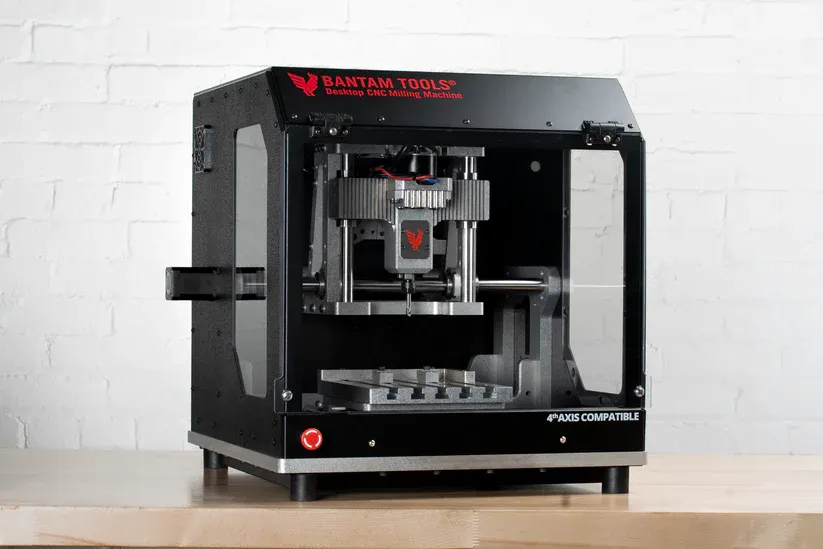
Bantam Tools' enclosed desktop mill ships with its own dedicated software and is purpose-built for prototyping in aluminum, softer metals, and plastics. The fully enclosed powder-coated steel frame, safety interlocks, and built-in E-stop make it genuinely office-safe. The 28,000 RPM spindle with ER-11 collet favors small-diameter tooling and fine detail work rather than heavy material removal. It is one of the most software-integrated desktop mills available for engineers and product designers who need to go from CAD file to aluminum prototype on a tight bench. The tradeoff is a relatively compact 7 x 9 x 3.3-inch work envelope and a price that, once you add fixturing and a proper starter tooling set, clears $5,000. Not a production mill; a prototyping tool. Pricing last confirmed via introductory period documentation; check bantamtools.com for current pricing.
Makera
Carvera
Model: Carvera
The Carvera is one of the only desktop CNC machines at this price tier to include a genuine 6-position automatic tool changer. That means unattended tool changes during a program, which enables multi-step jobs (rough, finish, drill) without babysitting the machine. The enclosed footprint, auto-probing, and WiFi connectivity make it practical in an office or studio. Work area is approximately 11.8 x 8.3 x 3.7 inches, and it handles wood, plastics, soft aluminum, and PCBs. The Carvera Air variant ($2,499 as of mid-2026) drops the ATC for a quick-change lever system and expands the work area to 11.8 x 7.9 x 5.1 inches, making it the stronger wood-and-plastic-focused option. For makers and small product companies that run mixed jobs and value automation over cost, the full Carvera is among the most capable enclosed desktop machines available.
Penta Machine Co.
Pocket NC V2-10
Model: Pocket NC V2-10
The Pocket NC V2-10 is one of the few true simultaneous 5-axis desktop mills sold to individual buyers. At $7,499 with no air supply required, it accepts standard G-code, runs at up to 10,000 RPM on an ER-11 collet, and handles aluminum, Delrin, and softer metals across a 5.0 x 4.55 x 3.55-inch travel envelope. The V2-50 variant pushes to 50,000 RPM (requires an air supply) for $10,799 and suits harder alloys and fine finishing passes. For jewelry makers, dental labs, and prototype shops cutting small, complex 3D parts in metal, this is one of the most practical 5-axis entry points available. The work envelope is genuinely small; this is a machine for parts that fit in your hand, not structural components.
Carbide 3D
Shapeoko 5.1 Pro (4x4)
Model: Shapeoko 5.1 Pro (4x4)
The Shapeoko 5.1 Pro is one of the most widely supported prosumer CNC routers sold in the United States, with hardened linear rails and ballscrews replacing the belt-drive of earlier generations. The 4x4 configuration gives a 33 x 33-inch cutting area suited to cabinetry, signs, and nested part production. Carbide 3D bundles Carbide Motion (controller) and Carbide Create (CAD/CAM) software, which meaningfully reduces the learning curve for first-time CNC buyers. The machine cuts wood, MDF, plastics, and light aluminum reliably, but steel is not a realistic material. Dust collection is not included and should be budgeted separately. The 2x2 variant starts at $2,980 and is a reasonable entry point for smaller-shop woodworkers.
Onefinity CNC
Woodworker PRO (X-50)
Model: Woodworker PRO (X-50)
Onefinity ships ballscrews as standard across its lineup, which is unusual at this price point. The Woodworker X-50 gives a 32 x 32-inch cutting area, and the built-in web-based controller with touchscreen display means no dedicated computer is required. The frame assembles in roughly 30 minutes. Community support is strong and there is an active upgrade ecosystem. The tradeoff versus the Shapeoko 5.1 Pro is a smaller accessory and software ecosystem: Onefinity uses the Buildbotics-derived controller, and serious production users often upgrade to a third-party controller. Aluminum cutting is possible with careful technique, but this is primarily a wood-and-plastic machine. Add a router or spindle separately; it does not ship with one.
Avid CNC
PRO4848
Model: PRO4848
The Avid PRO4848 steps up to a welded steel frame, linear rails, ballscrews, and a 2,200W spindle on a 4 x 4-foot (1,220 x 1,220 mm) cutting area. That combination of rigidity and power positions it above hobby routers for sign shops, furniture makers, and light-production facilities cutting hardwood, sheet goods, and aluminum plate consistently. The modular architecture allows frame expansion and spindle upgrades. Unlike desktop machines, this requires a dedicated table/stand and a dust collection setup, adding $1,000-$3,000 to initial build cost. Steel cutting is not realistic at this price tier regardless of rigidity; the machine is built for non-ferrous materials and wood.
Tormach
1100MX
Model: 1100MX
The Tormach 1100MX is one of the most accessible true CNC mills for small businesses that need to cut aluminum, titanium, and mild steel reliably. The BT30 spindle, three servo motors, 10,000 RPM top speed, and PathPilot controller put it in a different class from hobby routers: this is a machine designed for production runs and precision parts, not sign-cutting. The 18 x 11 x 16.25-inch work envelope covers most small-part manufacturing needs, and it runs on single-phase 230V power (no three-phase industrial wiring required). The honest constraint is that $29,479 buys the base machine only. A full Essentials Package (with tooling and workholding basics) starts at $39,119, and real tooling plus a flood coolant setup adds further cost. For a one-person shop making production parts in metal, this is among the most field-proven options at its price point.
Choosing a CNC machine for a small shop is one of the more consequential equipment decisions a maker or business owner can make. The price range is enormous (roughly $2,500 to $50,000 and beyond for the machines covered here), the capability gaps between tiers are real and consequential, and the marketing language is frequently misleading about what a given machine can and cannot do with which materials.
This guide cuts through that noise. It covers the four main tiers available to small shops and independent businesses in 2026: desktop mills for precision prototyping, prosumer CNC routers for wood and plastic production, higher-end routers stepping into light aluminum work, and entry industrial mills for shops that need to cut metal reliably every day.
Every price in this guide comes from a manufacturer page or third-party source checked at the time of writing. Where pricing requires a quote or changes frequently, we note it.
The Single Most Important Question: What Are You Cutting?
Before evaluating any machine, be honest about your material mix. This single factor determines which machine tier you actually need, and it drives a cost jump that no amount of clever technique can bridge.
Wood, MDF, plastics, foam: A prosumer CNC router in the $2,500-$5,500 range handles these materials well. The Shapeoko 5.1 Pro, Onefinity Woodworker, and Avid PRO4848 are all built for this application.
Aluminum (occasional or thin sheet): Prosumer routers with ballscrews and rigid frames can cut aluminum at slow feed rates and shallow depths. Results are achievable but require care, and tool life is shorter than on a proper mill. If aluminum is more than an occasional task, the desktop mill tier ($7,500-$10,000) is more practical.
Aluminum (production volume) and mild steel: This is where the tier jump becomes unavoidable. A router-class machine lacks the torque, low-RPM capability, and structural rigidity that consistent metal cutting requires. The entry point for reliable steel cutting is a proper CNC mill, and in 2026 that means budgeting at least $29,000-$50,000 for a new machine.
Hard steel, titanium, stainless: Industrial mills in the Haas Mini Mill class or above. These are out of scope for most small shops but are addressed briefly for context.
Tier 1: Desktop CNC Mills (Prototyping and Small Metal Parts)
Desktop mills occupy a specific niche. They are fully enclosed, office-friendly machines designed for precision prototyping in aluminum, soft metals, and engineering plastics. They are not high-volume production machines, and their work envelopes are small. But within their envelope, they deliver accuracy and surface finish that no router-class machine can match.
Bantam Tools Desktop CNC Milling Machine
Bantam Tools’ enclosed benchtop mill is one of the more polished desktop machining solutions available for product designers and engineers. The fully enclosed steel frame, integrated E-stop, and safety interlocks make it practical in a design studio or lab setting. The 28,000 RPM spindle with ER-11 collet is optimized for small-diameter tooling and fine detail work in aluminum and softer metals.
The work envelope is 7 x 9 x 3.3 inches, which means parts must be modest in size. The machine ships with Bantam Tools’ own software, which streamlines setup but does reduce flexibility compared to machines that accept standard CAM output directly. Pricing has been in the $3,999-$4,000 range; check bantamtools.com for current pricing as it is adjusted periodically.
For PCB prototyping and small aluminum fixtures, this is one of the most purpose-fit tools available at this price.
Makera Carvera and Carvera Air
Makera offers two machines that are philosophically different despite their shared name. The Carvera includes a 6-position automatic tool changer, which is genuinely unusual for a desktop machine at any price. This enables unattended multi-operation jobs, including rough, finish, and drill sequences in a single program. Work area is approximately 11.8 x 8.3 x 3.7 inches, and the machine handles wood, plastics, and light aluminum. Priced at approximately $5,499 as of mid-2026.
The Carvera Air ($2,499) replaces the ATC with a lever-based quick-change system and offers a slightly larger work area of 11.8 x 7.9 x 5.1 inches. It is quieter, lighter, and better suited to wood and plastic-focused shops that do not need automated tool changes. Both models are fully enclosed with auto-probing and WiFi connectivity.
For makers and small product companies who need automated multi-tool programs in a compact desktop footprint, the Carvera’s ATC is one of the most practical offerings in the market as of mid-2026.
Penta Machine Co. Pocket NC V2-10
The Pocket NC V2-10 is one of the few genuine simultaneous 5-axis desktop mills available to individual buyers at a realistic price. At $7,499, it machines aluminum, Delrin, and softer metals across a 5.0 x 4.55 x 3.55-inch travel envelope using an ER-11 spindle at up to 10,000 RPM. No air supply is required, which keeps the infrastructure requirement simple.
The V2-50 ($10,799) pushes to 50,000 RPM for harder alloys and fine finishing passes, but requires an air supply. Both machines accept standard G-code.
For jewelry makers, dental labs, mold shops, and prototype engineers cutting small, geometrically complex 3D parts in metal, the Pocket NC V2-10 is one of the more accessible 5-axis entry points available. The work envelope is a hard constraint; this is not a machine for parts larger than a fist.
Tier 2: Prosumer CNC Routers (Wood, Plastic, and Light Aluminum)
This is the largest and most competitive tier, and it is where the majority of small-shop buyers land. Machines here range from $2,400 to $5,500 and are optimized for wood, MDF, plastics, and sheet goods. The better machines in this tier (ballscrew-equipped, with rigid frames) can also handle occasional aluminum work with appropriate expectations.
Carbide 3D Shapeoko 5.1 Pro
The Shapeoko 5.1 Pro is a redesign of one of the most widely sold CNC routers in the US hobbyist and prosumer market. The key upgrade from earlier generations is hardened linear rails and ballscrews, replacing the belt-drive system of previous Shapeoko models. This meaningfully improves rigidity and repeatability for production use.
The 4x4 configuration (roughly 33 x 33 inches of cutting area) starts at $3,550 as of mid-2026; the 2x2 variant starts at $2,980. Carbide 3D bundles Carbide Motion (machine controller) and Carbide Create (free 2D and 2.5D CAM software), which is a genuine advantage for buyers new to CNC. The 4x4 machine with full bundled accessories (BitSetter, dust boot, Power Pendant) is a reasonably complete package for a wood and plastic shop.
Steel is not a realistic material. Aluminum is possible at careful settings but is secondary to the machine’s wood and plastic focus.
Onefinity CNC Woodworker PRO (X-50)
Onefinity’s design philosophy centers on ballscrews as standard (not an upgrade) across the entire lineup, which historically distinguished it from belt-drive routers in the same price range. The Woodworker PRO X-50 gives a 32 x 32-inch cutting area and ships with a built-in web-based touchscreen controller, so no external PC is required. Assembly is approximately 30 minutes. Pricing for the X-50 with controller and interface has been reported around $2,453, making it among the more competitive ballscrew routers at this spec level.
The machine does not ship with a router or spindle; add a trim router or 65mm spindle separately ($200-$800 depending on specification). The Buildbotics-derived controller works well for most users but is less feature-rich than industrial controllers; some serious production users upgrade to a third-party controller over time.
Community support is strong. The Onefinity forum has active troubleshooting and upgrade documentation.
Avid CNC PRO4848
The Avid PRO4848 steps up to a welded steel frame with linear rails, ballscrews, and a 2,200W spindle on a 4 x 4-foot work area. At approximately $5,200 as of mid-2026, it sits above the Shapeoko and Onefinity tier and is aimed at sign shops, furniture makers, and small-production facilities running the machine commercially.
The welded steel frame and heavier construction contribute to better rigidity under sustained cutting loads, which matters for shops cutting hardwood and sheet goods all day. The modular architecture allows frame expansion. A dedicated table, stand, and dust collection setup are required and add $1,000-$3,000 to build cost. This machine takes more space and setup effort than benchtop alternatives; plan for a dedicated shop bay, not a corner of a shared workspace.
Tier 3: Entry Industrial Mills (Cutting Metal Seriously)
This is where the price and capability step-change happens. If your shop needs to cut steel, titanium, or high-strength aluminum alloys reliably and in production volume, you need a real CNC mill. In 2026, the entry point for that capability is roughly $29,000-$50,000 for a new machine, with substantial additional cost for tooling, workholding, and coolant systems.
Tormach 1100MX
The Tormach 1100MX is one of the most field-proven entry industrial mills for small shops. It runs on single-phase 230V power (not three-phase industrial wiring), which is a practical advantage for shops without industrial electrical infrastructure. The BT30 spindle, three servo motors, and 10,000 RPM top speed handle aluminum, titanium, and mild steel reliably. Work envelope is 18 x 11 x 16.25 inches.
The base machine is priced at $29,479 as listed at tormach.com. The Essentials Package (which includes a tooling starter set and workholding basics) starts at $39,119. Real-world tooling beyond that starter package, flood coolant setup, and a proper vise can add another $3,000-$6,000 before you cut your first production part.
Tormach’s PathPilot controller is included free on all machines and is one of the more approachable industrial controls for shops without dedicated CNC machinists. The machine is explicitly designed for one-person shops, R&D labs, and small production runs rather than high-volume factory use.
Customer feedback noted in industry reviews highlights that upgrade options can be costly; budget for the complete package rather than planning to add up to a production-capable setup.
Haas Mini Mill
The Haas Mini Mill is the reference point for compact machining centers in the US market and is taught in more vocational and community college CNC programs than any other machine. A 2024 ground-up redesign introduced FEA-optimized castings roughly 30% heavier than the prior generation, improving rigidity and thermal stability.
Travel is 16 x 14 x 15 inches. The 5.6 kW (7.5 hp) spindle tops out at 8,000 RPM and cuts steel, aluminum, titanium, and alloys in production conditions. The Haas control is one of the most widely trained CNC controls in existence, which makes hiring and operator training significantly easier than proprietary alternatives.
Base pricing for the Mini Mill is reported around $30,000, with most buyers adding the 20-pocket automatic tool changer, probing, and other options to reach a configured price typically in the $35,000-$45,000 range. Haas publishes a Build and Price tool for real-time configured pricing. For shops that expect to hire an operator or send staff to community college CNC training, the Haas ecosystem’s ubiquity is a genuine operational advantage.
Syil X5 (Brief Note)
The Syil X5 is a compact CNC mill with a 16-pocket servo ATC, a 20,000 RPM direct-coupled BT30 spindle, and an 11.8 x 10.2 x 11.8-inch work envelope. It runs the Siemens SINUMERIK 828D control as standard, which is a genuine industrial controller rather than a hobbyist-grade solution. Syil does not publish prices directly; contact us.syil.com for current pricing. The X5 sits between the Tormach 1100MX and Haas Mini Mill in market positioning and is worth evaluating for shops that want a Siemens-controlled machine with ATC at a competitive price point.
Buying Dimensions: What Actually Matters
Work Envelope
Match the machine’s usable cutting area to your largest likely part, with margin. A 4x4 router covers most sign and cabinet work. For structural aluminum fixtures or larger 3D parts, the 18 x 11-inch Tormach table or the Haas 16 x 14-inch table is more appropriate. Desktop mill envelopes (5-9 inches on a side) are genuinely small; measure your typical workpiece before buying.
Spindle Power and Speed Range
Routers run 12,000-30,000 RPM with modest torque, which is correct for wood and plastics. Metal cutting at any serious depth requires torque at low RPM (typically 1,000-6,000 RPM for steel), which routers cannot deliver. A 1.5-2.2 kW spindle in the prosumer router tier is adequate for wood production; the 1.5 kW (2 hp) Tormach spindle and 5.6 kW Haas spindle reflect the power genuinely required for metal.
Rigidity
Frame deflection under cutting load determines surface finish quality and tool life. Belt-drive routers deflect under moderate load; ballscrew routers with steel frames deflect less; dedicated CNC mills with ground ways or linear guides and a heavy cast column deflect least. For wood and plastic, reasonable rigidity is achievable at prosumer prices. For steel, rigidity requirements are an order of magnitude higher than any router delivers.
Tool Changer: Manual vs. ATC
Manual tool changes (pausing the program, swapping the tool, re-probing) add 2-5 minutes per change. For a single-operation job, this is a non-issue. For multi-operation production runs, a 20-pocket ATC on a Haas Mini Mill or the 6-position ATC on a Makera Carvera pays back quickly in operator time. Syil’s X5 includes a 16-pocket ATC. Tormach offers an ATC add-on but it is not standard.
Enclosure and Dust/Coolant
Routers cutting wood generate large volumes of fine dust. A quality dust collection system ($500-$2,000) is not optional; exposure to fine wood dust is a documented respiratory hazard. Metal-cutting mills require flood coolant or at minimum mist coolant to manage heat and chip removal. Factor both into your total build cost. The Bantam Tools and Carvera machines are fully enclosed and self-contained; open-frame routers require external dust handling.
Software and Controller
The learning curve varies significantly. Machines with bundled CAM (Shapeoko/Carbide Create, Bantam Tools software) lower the barrier to a first cut but limit advanced functionality. Fusion 360 is the dominant prosumer CAM platform and works with virtually every machine that accepts G-code. Haas and Siemens controls require dedicated learning but are industry-standard skills. PathPilot (Tormach) is approachable for shops without a dedicated machinist. Match the controller complexity to your team’s background.
Total Cost of Ownership: Budget Beyond the Machine
This is the section most buyers underestimate. Cost guidance from industry sources for 2026:
- Tooling (starter): $500-$1,500 for a prosumer router; $2,000-$5,000 for an entry industrial mill, including end mills, drills, and collets.
- Workholding: $200-$1,000 for a quality vise; clamps, t-track, and custom fixtures add more. For production, budget $1,000-$3,000 for a complete workholding setup.
- Dust collection or coolant: $500-$2,000 for a router shop dust system; $1,000-$3,000 for a flood coolant setup on a metal mill.
- Software: $0-$700/year depending on CAM choice (Fusion 360 personal is free for qualifying hobbyists; professional licenses are priced differently; VCarve Pro is a one-time $699 purchase for wood-focused routing).
- Ongoing consumables: End mills and inserts are the primary ongoing cost. Budget 5-10% of machine value per year for replacement tooling and maintenance supplies on a production machine.
A realistic all-in budget for a production-ready prosumer router setup is $4,500-$8,000. A production-ready entry industrial mill setup (Tormach 1100MX Essentials Package plus proper tooling and coolant) is more realistically $45,000-$50,000.
A Note on Lasers and Plasma
Laser cutters and plasma tables are sometimes grouped with CNC routers in the same buying conversation, but they are different tools for different outcomes. CO2 and diode lasers excel at engraving, marking, and cutting sheet stock (wood, acrylic, leather) but cannot mill 3D profiles or hold tight-tolerance dimensions on cut edges. Plasma tables cut conductive metal sheet quickly but with a heat-affected zone and kerf that is less precise than milling. If your shop’s primary need is fast 2D sheet cutting in metal, a plasma table is worth evaluating separately. If you need 3D material removal and dimensionally precise parts, a CNC mill or router is the correct tool.
Summary: Which Tier Is Right for Your Shop?
| Need | Recommended tier | Entry price (machine only) |
|---|---|---|
| PCB prototyping, small aluminum fixtures | Desktop mill (Bantam Tools, Carvera) | ~$2,499-$5,499 |
| Complex small 3D metal parts | 5-axis desktop mill (Pocket NC V2-10) | ~$7,499 |
| Signs, furniture, wood production | Prosumer router (Shapeoko 5.1 Pro, Onefinity) | ~$2,450-$3,550 |
| Wood + occasional aluminum, larger format | Prosumer router, step-up (Avid PRO4848) | ~$5,200 |
| Aluminum and mild steel, production | Entry industrial mill (Tormach 1100MX) | ~$29,479 |
| Steel, high-throughput, hire-able control | Compact VMC (Haas Mini Mill) | ~$30,000+ |
The honest takeaway: do not buy below your material requirements hoping technique will compensate. The price jump between a prosumer router and an entry industrial mill exists because the engineering gap between them is real. Buy for the materials you actually need to cut.
If you want to add material instead of cutting it away, see our guide to the best 3D printers in 2026. For robots that tend these machines, see the best assembly line robots in 2026.
Frequently asked questions
Can a CNC router cut aluminum?
Can a CNC router cut steel?
What does it really cost to start CNC machining?
Is an automatic tool changer (ATC) worth the cost?
What software do I need to run a CNC machine?
CNC mill or CNC router: what is the actual difference?
CNC machine or 3D printer: which one for small-business production?
Sources
Every claim in this guide that isn't first-person experience is traceable to one of the sources below. URLs verified at publication; some may rot. Let us know if so.
- Bantam Tools Desktop CNC Milling Machine · Bantam Tools, 2026Official product page; source for specifications and pricing reference
- Carvera: The Smartest Desktop CNC Machine · Makera, 2026Official product page; source for Carvera ATC pricing (~$5,499) and specs
- Carvera Air: A Smart and Affordable Desktop CNC Machine · Makera, 2026Official product page; source for Carvera Air pricing (~$2,499) and specs
- Pocket NC V2-10 · Penta Machine Co., 2026Official product page; source for V2-10 price ($7,499) and V2-50 price ($10,799)
- Shapeoko 5.1 Pro CNC Router · Carbide 3D, 2026Official product page; source for Shapeoko 5.1 Pro pricing from $3,550 (4x4)
- Onefinity CNC PRO Series · Onefinity CNC, 2026Official category page; source for PRO series product range
- Onefinity Machinist X-50 Specs, Score, and Review (2026) · CNCRouterInfo, 2026Third-party review; corroborates pricing data for Onefinity PRO models
- PRO4848 4' x 4' CNC Router Machine · Avid CNC, 2026Official product page; source for PRO4848 specs and pricing (~$5,200)
- Tormach 1100MX CNC Mill · Tormach, 2026Official product page; source for 1100MX base price ($29,479) and specifications
- Tormach 1100MX CNC Mill Essentials Package · Tormach, 2026Source for Essentials Package pricing (~$39,119)
- Mini Mill | 40-Taper Mill | Vertical Mills · Haas Automation, 2026Official product page; source for Mini Mill specs and build-and-price reference
- Can You Use a CNC Router on Metal? · AccTek CNC, 2025Technical overview of router vs. mill material limitations
- Beyond the Sticker Price: The Real Cost of CNC Ownership · XPRO CNC, 2025Total cost of ownership breakdown including tooling, workholding, and maintenance